

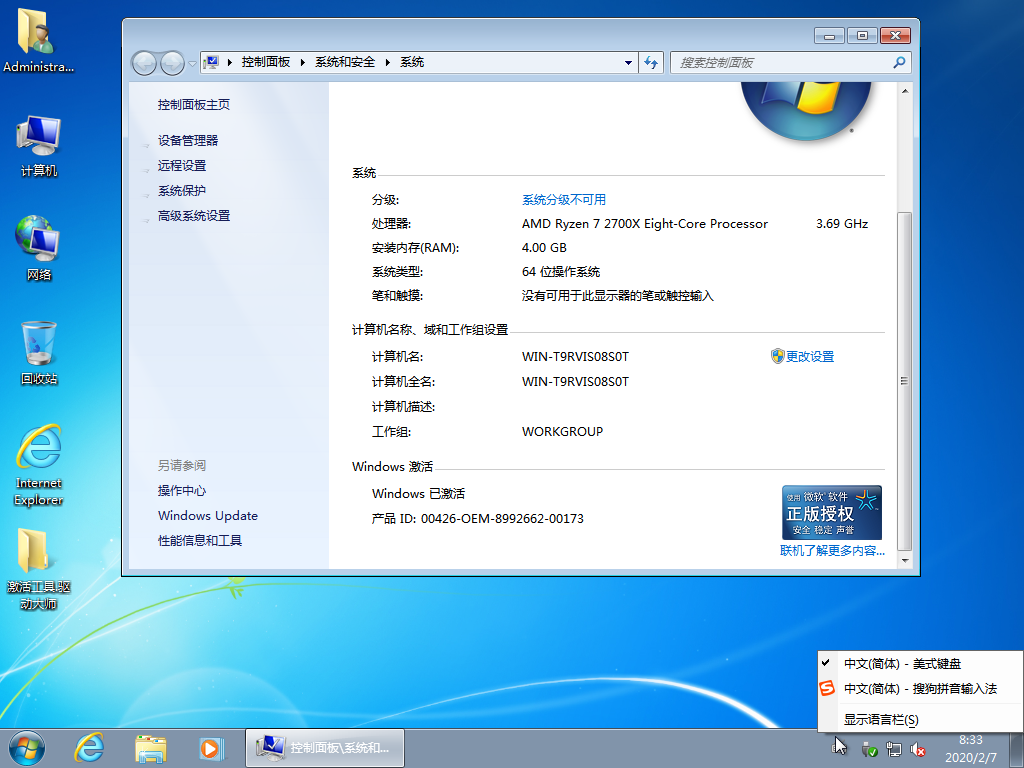
系统是基于微软WIN7 SP1 64位原版镜像制作而成。从2020年1月15号开始,微软正式停止Windows7操作系统支持,不再免费提供安全修补或累积更新服务。
集成2020年02月最新补丁,无人值守自动安装,自动激活笔记本、品牌机以及组装兼容机,集成经典计算器.
更新日志:2020.02.07
多次测试并未发现问题
去掉系统OEM的全部信息(感谢subaobao_ok反馈)
调整IE首页为百度,无广告,无流氓,无OEM,打造全网最纯净的系统!
体积比较大是因为增加了适度精简版,追求稳定,没有过度优化,可办公!
删除全部输入法集成搜狗拼音去广告版9.5A
增加文件属性校验工具
调整顽石系统优化方案运行更快
适度精简版安装完可用Dism++清理减少系统盘占用体积
修复上个版本系统安装时间较久的问题。
更新NET为4.7(感谢jidaojie反馈)
精减如下:
自然语言
语音识别
Dvd Maker
Media Center
WinOcr
输入法
默认administrator账户登录
精简Defender自带杀软
集成VB6/VC2005/VC2008/VC2010/VC2012/VC2013/VC2019/DX9最新版常用运行库。
更新WinRAR v5.80去广告版
集成Flash.Player.去广告版
集成驱动总裁万能网卡版本(集网卡、USB3.X、NVME补丁、SRS驱动)
其他细节不一一列举
1) 顽石Win7旗舰版 IE11 适度精简(内置Admin)
2) 顽石Win7旗舰版 IE11 极限精简(内置Admin)
3) 顽石Win7旗舰版 IE8 适度精简(内置Admin)
4) 顽石Win7旗舰版 IE8 极限精简(内置Admin)
慎用网上各种U盘PE,可能在无提示的情况下修改系统主页、安装各种推广软件包含恶意插件,甚至在系统中做手脚留后门,推荐使用顽石U盘启动制作工具来安装系统!真正纯净无流氓。BUG反馈群:143243027
适度精简版:可增减配置功能开关,可以使用Windows 更新。
极限精简版:极限精简winsxs,故配置开关不可用,不可更新。
文件名称: D:\WS_Win7_x64_4in1_7601.24544.esd
文件大小: 1.75 GB (1,886,419,182 字节)
修改时间: 2020年02月07日,08:28:07
MD5: 82D02AB0F0B83DF9DE62F288A9DDEBF3
SHA1: 8F26642D6F31CDE5F63B961E65BD596FDBA1ED57
文章源自WINOS-https://www.winos.me/archives/1587.html
 文章源自WINOS-https://www.winos.me/archives/1587.html
文章源自WINOS-https://www.winos.me/archives/1587.html
文章源自WINOS-https://www.winos.me/archives/1587.html
[Windows 7 (x86_64) | Firefox 73.0 | 中国 山东 中国移动]
51F
登录回复
感谢分享
[Windows 7 (x86_64) | QQ Browser 10.5 | 中国 广东 中国电信]
52F
登录回复
感谢分享
[Windows 10 (x86_64) | Firefox 73.0 | 中国 山西 中国电信]
53F
登录回复
感谢分享
[Windows 10 (x86_64) | Firefox 73.0 | 中国 广西 中国电信]
54F
登录回复
感谢分享
[Windows 10 (x86_64) | Chrome 69.0 | 中国 山西 中国电信]
55F
登录回复
感谢楼主分享
[Windows 7 (x86_64) | Sogou Explorer 2 | 中国 山东 中国移动]
56F
登录回复
感谢
[Windows 7 (x86_64) | Sogou Explorer 2]
57F
登录回复
感谢
[Windows 8.1 (x86_64) | Chrome 63.0 | 中国 北京 中国联通]
58F
登录回复
回复
感谢分享
[Windows 7 | Internet Explorer 11.0 | 中国 广东 中国移动]
59F
登录回复
大神一出,必属精品
[Windows 7 (x86_64) | Internet Explorer 11.0 | 中国 陕西 中国电信]
60F
登录回复
支持一下。
[Android 9 | Mi Browser 11.8 | 中国 广东 中国电信]
61F
登录回复
感谢分享
[Windows 10 (x86_64) | Firefox 73.0 | 中国 黑龙江 中国联通]
62F
登录回复
谢谢分享
[Windows 7 (x86_64) | Chrome 63.0 | 中国 安徽 中国电信]
63F
登录回复
感谢分享
[Windows 10 (x86_64) | QQ Browser 10.5 | 中国 河南 中国电信]
64F
登录回复
牛逼 谢谢分享!
[Windows 7 (x86_64) | Chrome 75.0 | 中国 辽宁 中国电信]
65F
登录回复
感谢分享
[Windows 10 (x86_64) | Chrome 80.0 | 中国 云南 中国电信]
66F
登录回复
感谢分享
[Windows 7 (x86_64) | Chrome 77.0 | 中国 云南 中国电信]
67F
登录回复
感谢分享
[Windows 7 (x86_64) | Chrome 69.0 | 中国 广西 中国联通]
68F
登录回复
感谢分享
[Windows 10 (x86_64) | Chrome 78.0]
69F
登录回复
谢谢分享
[Windows 10 (x86_64) | Microsoft Edge 80.0]
70F
登录回复
谢谢分享
[Windows 10 (x86_64) | Chrome 78.0]
71F
登录回复
感谢分享
[Windows 10 (x86_64) | Chrome 78.0]
72F
登录回复
谢谢分享 谢谢
[Windows 10 (x86_64) | Chrome 78.0]
73F
登录回复
感谢分享
[Windows 10 (x86_64) | Internet Explorer 11.0]
74F
登录回复
非常感谢,刚好找到一台放了很久的2代i3的电脑……
[Windows 7 (x86_64) | Firefox 68.0]
75F
登录回复
感谢分享啊,谢谢
[Windows 10 (x86_64) | Chrome 78.0]
76F
登录回复
楼主666
[Mac 10.13 | Safari 11.1]
77F
登录回复
感谢分享
[Windows 7 | Maxthon 5.3]
78F
登录回复
非常喜欢,刚好需要
[Windows 10 (x86_64) | Chrome 80.0 | 中国 海南 中国电信]
79F
登录回复
感谢分享,看一看
[Windows 10 (x86_64) | Chrome 78.0 | 中国 河南 中国移动]
80F
登录回复
感谢分享
[Windows 7 | Chrome 78.0 | 中国 广东 中国移动]
81F
登录回复
感谢分享,收藏了
[Windows 7 (x86_64) | Chrome 79.0]
82F
登录回复
感谢分享 支持
[Windows 10 (x86_64) | Chrome 69.0]
83F
登录回复
66666666666666
[Windows 10 (x86_64) | Maxthon 5.3]
84F
登录回复
感谢分享
[Windows 7 (x86_64) | Chrome 80.0]
85F
登录回复
感谢分享 试下看看
[Windows 10 (x86_64) | Chrome 69.0]
86F
登录回复
7777777777777777
[Windows 10 (x86_64) | Chrome 63.0]
87F
登录回复
感谢分享
[Windows 7 | Chrome 63.0 | 中国 江西 中国电信]
88F
登录回复
感谢分享
[Windows 7 | QQ Browser 10.5]
89F
登录回复
慕名而来
[Windows 7 (x86_64) | QQ Browser 9.6]
90F
登录回复
来了 谢谢分享
[Windows 7 (x86_64) | QQ Browser 10.5]
91F
登录回复
还有这么干净的系统
[Windows 7 (x86_64) | Cheetah Browser]
92F
登录回复
感谢分享
[Windows 7 (x86_64) | Cheetah Browser]
93F
登录回复
支持楼主,辛苦了,下载试试
[Windows 10 (x86_64) | Chrome 63.0 | 中国 内蒙古 中国电信]
94F
登录回复
奶牛链接失效。。
[Windows 7 (x86_64) | Chrome 78.0]
95F
登录回复
系统特别好用,就是更改默认administrator的帐户名后不能设密码,设了密码重启会又出现一个带密码的administrator帐户,然后就没法登陆了,进PE里用password想去除密码,也不显示administrator帐户,希望能修复
[Windows 7 (x86_64) | Chrome 80.0]
96F
登录回复
谢谢
[Windows 7 (x86_64) | Chrome 63.0]
97F
登录回复
aaaaaaaaaaaagwskankan
[Windows 10 (x86_64) | Chrome 80.0]
98F
登录回复
谢谢
[Windows 7 | Chrome 63.0]
99F
登录回复
感谢分享
[Windows 7 (x86_64) | UBrowser 6.2]
100F
登录回复
试试看好不好用